Wednesday, 5 June 2013

Jqgrid with asp.net mvc is just awesome ..


Please follow the below link for download sample application in asp.net mvc 
this is just easy to implement with rich functionality inside ... this boom must try


demo page link ..
http://www.trirand.net/demoaspnetmvc.aspx

download link .

http://www.trirand.net/download.aspx 


Thursday, 28 March 2013

Asp.Net Mvc With Web Api


ASP.NET Web API is a framework that makes it easy to build HTTP services that reach a broad range of clients, including browsers and mobile devices. With WebAPI content negotiation, one can return data based on the client requests. What I mean is, if the client is requesting the data to be returned as JSON or XML, the WebAPI framework deals with the request type and returns the data appropriately based on the media type. By default WebAPI provides JSON and XML based responses.

WebAPI is an ideal platform for building pure HTTP based services where the request and response happens with HTTP protocol. The client can make a GET, PUT, POST, and DELETE request and get the WebAPI response appropriately.

In Summary, the WebAPI is

- An HTTP Service

- Designed for broad reach

- Uses HTTP as an Application protocol, not a transport protocol


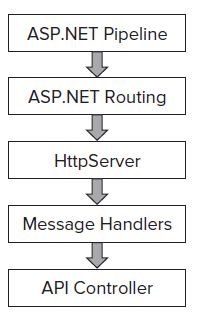
Web API Architecture .

We shall see below the Web API architecture when you are hosting the WebAPI in ASP.NET and self-hosting through console or windows service.


Follow this link  for the detail article ....
Thursday, 21 February 2013

Send Mail from gmail server


Reuiqred Name space " using System.Net.Mail; "
////  (1) Create the MailMessage instance

                MailMessage mm = new MailMessage();

  ////'(2) Assign the MailMessage's properties

                mm.From = new MailAddress("info@gmail.com", "Ravi");

                mm.To.Add("Example@gmail.com");

                mm.Subject = "Any Subject  ";

                mm.Body = ex.Message.ToString(); //Body of your mail

                mm.IsBodyHtml = false;//

 ////'(3) Create the SmtpClient object


                SmtpClient smtp = new SmtpClient("smtp.gmail.com",587);

                smtp.EnableSsl = true;

                //smtp.DeliveryMethod = SmtpDeliveryMethod.Network; //it may be depend on your network

 //'(4) Send the MailMessage (will use the Web.config settings)

                smtp.Credentials = new System.Net.NetworkCredential("GmailId", "Passward");            
                smtp.Send(mm);

Wednesday, 16 January 2013

Send mail from sql server

Let me start this blog post with negative note: SQL Server is not mass mailing software. If you are thinking of sending emails using SQL Server instead of your mail server – I suggest you stop doing that NOW! Whenever, I see any application using SQL Server as a mail server – I always vote against it. Well, if this is so bad, then why is it possible to send email through SQL Server. The reason is simple – there are many SQL Server Administrative scenarios where we need SQL Server to send emails, e.g. Maintenance task status, job failure messages, operators alerts etc. I suggest to use Database mail option during this situation. Click below follow this link for more details