Monday, 30 September 2013

virtual (C# Reference).

The virtual keyword is used to modify a method, property, indexer, or event declaration and allow for it to be overridden in a derived class. For example, this method can be overridden by any class that inherits it:
public virtual double Area() 
{
    return x * y;
}
The implementation of a virtual member can be changed by an overriding member in a derived class. For more information about how to use the virtual keyword, seeVersioning with the Override and New Keywords (C# Programming Guide) and Knowing When to Use Override and New Keywords (C# Programming Guide).

When a virtual method is invoked, the run-time type of the object is checked for an overriding member. The overriding member in the most derived class is called, which might be the original member, if no derived class has overridden the member.
By default, methods are non-virtual. You cannot override a non-virtual method.
You cannot use the virtual modifier with the staticabstract, private, or override modifiers. The following example shows a virtual property:
class MyBaseClass
{
    // virtual auto-implemented property. Overrides can only 
    // provide specialized behavior if they implement get and set accessors. 
    public virtual string Name { get; set; }

    // ordinary virtual property with backing field 
    private int num;
    public virtual int Number
    {
        get { return num; }
        set { num = value; }
    }
}


class MyDerivedClass : MyBaseClass
{
    private string name;

   // Override auto-implemented property with ordinary property 
   // to provide specialized accessor behavior. 
    public override string Name
    {
        get
        {
            return name;
        }
        set
        {
            if (value != String.Empty)
            {
                name = value;
            }
            else
            {
                name = "Unknown";
            }
        }
    }

}

Wednesday, 5 June 2013

Jqgrid with asp.net mvc is just awesome ..


Please follow the below link for download sample application in asp.net mvc 
this is just easy to implement with rich functionality inside ... this boom must try


demo page link ..
http://www.trirand.net/demoaspnetmvc.aspx

download link .

http://www.trirand.net/download.aspx 


Thursday, 28 March 2013

Asp.Net Mvc With Web Api


ASP.NET Web API is a framework that makes it easy to build HTTP services that reach a broad range of clients, including browsers and mobile devices. With WebAPI content negotiation, one can return data based on the client requests. What I mean is, if the client is requesting the data to be returned as JSON or XML, the WebAPI framework deals with the request type and returns the data appropriately based on the media type. By default WebAPI provides JSON and XML based responses.

WebAPI is an ideal platform for building pure HTTP based services where the request and response happens with HTTP protocol. The client can make a GET, PUT, POST, and DELETE request and get the WebAPI response appropriately.

In Summary, the WebAPI is

- An HTTP Service

- Designed for broad reach

- Uses HTTP as an Application protocol, not a transport protocol


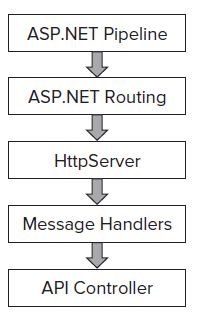
Web API Architecture .

We shall see below the Web API architecture when you are hosting the WebAPI in ASP.NET and self-hosting through console or windows service.


Follow this link  for the detail article ....

Thursday, 21 February 2013

Send Mail from gmail server


Reuiqred Name space " using System.Net.Mail; "
////  (1) Create the MailMessage instance

                MailMessage mm = new MailMessage();

  ////'(2) Assign the MailMessage's properties

                mm.From = new MailAddress("info@gmail.com", "Ravi");

                mm.To.Add("Example@gmail.com");

                mm.Subject = "Any Subject  ";

                mm.Body = ex.Message.ToString(); //Body of your mail

                mm.IsBodyHtml = false;//

 ////'(3) Create the SmtpClient object


                SmtpClient smtp = new SmtpClient("smtp.gmail.com",587);

                smtp.EnableSsl = true;

                //smtp.DeliveryMethod = SmtpDeliveryMethod.Network; //it may be depend on your network

 //'(4) Send the MailMessage (will use the Web.config settings)

                smtp.Credentials = new System.Net.NetworkCredential("GmailId", "Passward");            
                smtp.Send(mm);

Wednesday, 16 January 2013

Send mail from sql server

Let me start this blog post with negative note: SQL Server is not mass mailing software. If you are thinking of sending emails using SQL Server instead of your mail server – I suggest you stop doing that NOW! Whenever, I see any application using SQL Server as a mail server – I always vote against it. Well, if this is so bad, then why is it possible to send email through SQL Server. The reason is simple – there are many SQL Server Administrative scenarios where we need SQL Server to send emails, e.g. Maintenance task status, job failure messages, operators alerts etc. I suggest to use Database mail option during this situation. Click below follow this link for more details

Monday, 24 December 2012

what a trcik must check

http://blog.sqlauthority.com/2012/12/19/sql-server-select-and-delete-duplicate-records-sql-in-sixty-seconds-036-video/

Thursday, 20 December 2012

hashtable in asp.net c#

The Hashtable object contains items in key/value pairs. The keys are used as indexes, and very quick searches can be made for values by searching through their keys.


Hashtable hashtable = new Hashtable();
key = 1;
name = "A";
hashtable.Add(key,name);
key = 2;
name = "B";
hashtable.Add(key,name);
key = 3;
name = "lily";
hashtable.Add(key,name);


u can use foreach loop for read 

foreach (string key in hashtable.Keys)   {     
    Response.Write(key + '=' + hashtable[key] + "<br>");   
}

Friday, 14 December 2012

Sealed Classes in c# , .Net


Sealed classes are used to restrict the inheritance feature of object oriented programming. Once a class is defined as sealed class, this class cannot be inherited. 
In C#, the sealed modifier is used to define a class as sealed. In Visual Basic .NET,NotInheritable keyword serves the purpose of sealed. If a class is derived from a sealed class, compiler throws an error. 
If you have ever noticed, structs are sealed. You cannot derive a class from a struct.  

The following class definition defines a sealed class in C#: 
// Sealed class
sealed class SealedClass
{
    } 

In the following code, I create a sealed class SealedClass and use it from Class1. If you run this code, it will work fine. But if you try to derive a class from sealed class, you will get an error.
 

using System;
class Class1
{
    static void Main(string[] args)
    {
        SealedClass sealedCls = new SealedClass();
        int total = sealedCls.Add(45);
        Console.WriteLine("Total = " + total.ToString());
    }
}
// Sealed class
sealed class SealedClass
{
    public int Add(int x, int y)
    {
        return x + y;
    }
}  


Why Sealed Classes?
 

We just saw how to create and use a sealed class. The main purpose of a sealed class to take away the inheritance feature from the user so they cannot derive a class from a sealed class. One of the best usage of sealed classes is when you have a class with static members. For example, the Pens and Brushes classes of the System.Drawingnamespace. 
The Pens class represent the pens for standard colors. This class has only static members. For example, Pens.Blue represents a pen with blue color. Similarly, the Brushes class represents standard brushes. The Brushes.Blue represents a brush with blue color. 
So when you're designing your application, you may keep in mind that you have sealed classes to seal user's boundaries. 
In the next article of this series, I will discuss some usage of abstract classes. 

Wednesday, 12 December 2012

Http Handler and http Modules


ASP.NET handles all the HTTP requests coming from the user and generates the appropriate response for it. ASP.NET framework knows how to process different kind of requests based on extension, for example, It can handle request for.aspx.ascx and .txt files, etc. When it receives any request, it checks the extension to see if it can handle that request and performs some predefined steps to serve that request.

Now as a developer, we might want to have some of our own functionality plugged in. We might want to handle some new kind of requests or perhaps we want to handle an existing request ourselves to have more control on the generated response, for example, we may want to decide how the request for .jpg or .gif files will be handled. Here, we will need anHTTPHandler to have our functionality in place.
There are also some scenarios where we are ok with the way ASP.NET is handling the requests but we want to perform some additional tasks on each request, i.e., we want to have our tasks execute along with the predefined steps ASP.NET is taking on each request. If we want to do this, we can have HTTPModule in place to achieve that.
So from the above discussion, it is clear that HTTPHandlers are used by ASP.NET to handle the specific requests based on extensions. HTTPModule, on the other hand, is used if we want to have our own functionality working along with the default ASP.NET functionality. There is one Handler for a specific request but there could be N number of modules for that.


For more detail visit 
Click here

Union and Union All


UNION
The UNION command is used to select related information from two tables, much like the JOIN command. However, when using the UNION command all selected columns need to be of the same data type. With UNION, only distinct values are selected.
UNION ALL
The UNION ALL command is equal to the UNION command, except that UNION ALL selects all values.
The difference between Union and Union all is that Union all will not eliminate duplicate rows, instead it just pulls all rows from all tables fitting your query specifics and combines them into a table.

Tuesday, 11 December 2012

Magic tables In sql server

Magic tables are nothing but INSERTED, DELETED table scope level, These are not physical tables, only Internal tables. 

This Magic table are used In SQL Server 6.5, 7.0 & 2000 versions with Triggers only. 

But, In SQL Server 2005, 2008 & 2008 R2 Versions can use these Magic tables with Triggers and Non-Triggers also. 

Using with Triggers: 
If you have implemented any trigger for any Tables then, 
1.Whenever you Insert a record on that table, That record will be there on INSERTED Magic table. 
2.Whenever you Update the record on that table, That existing record will be there on DELETED Magic table and modified New data with be there in INSERTED Magic table. 
3.Whenever you Delete the record on that table, That record will be there on DELETED Magic table Only. 

These magic table are used inside the Triggers for tracking the data transaction. 

Using Non-Triggers: 
You can also use the Magic tables with Non-Trigger activities using OUTPUT Clause in SQL Server 2005, 2008 & 2008 R2 versions. 

Common Language Runtime (CLR)


The .NET Framework provides a run-time environment called the common language runtime, which runs the code and provides services that make the development process easier.
Compilers and tools expose the common language runtime's functionality and enable you to write code that benefits from this managed execution environment. Code that you develop with a language compiler that targets the runtime is called managed code; it benefits from features such as cross-language integration, cross-language exception handling, enhanced security, versioning and deployment support, a simplified model for component interaction, and debugging and profiling services.

Friday, 7 December 2012

Cord first entity framwork

try the link for learn in breif 

http://msdn.microsoft.com/en-us/data/gg685467.aspx